
Help Center Items
Record a sale
Enter the sale price, and Hermes works out fees and profit.
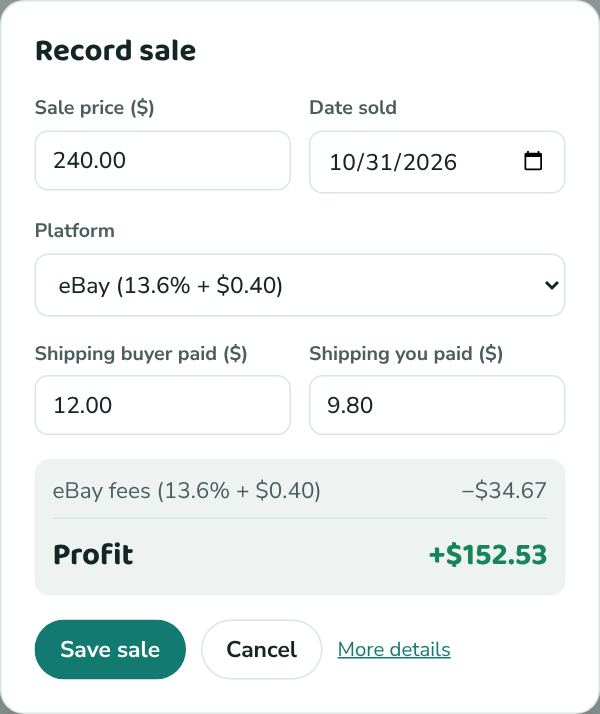
- Open the item and click Record sale.
- Check the Sale price: the item price, without shipping. It starts at your list price, so if it sold for what you asked, leave it; if you took an offer, change it.
- Check Date sold (today) and the Platform (the one it was listed on).
- Fill in Shipping buyer paid and Shipping you paid (the label or postage), if any.
- Check the fees and profit at the bottom, then click Save sale.
Need to add ad fees, a refund, the exact fee from your sales report, or tracking? Click More details in the popup, or Edit on a sold item.
The item moves to Sold, and its Profit card shows exactly where the money went.
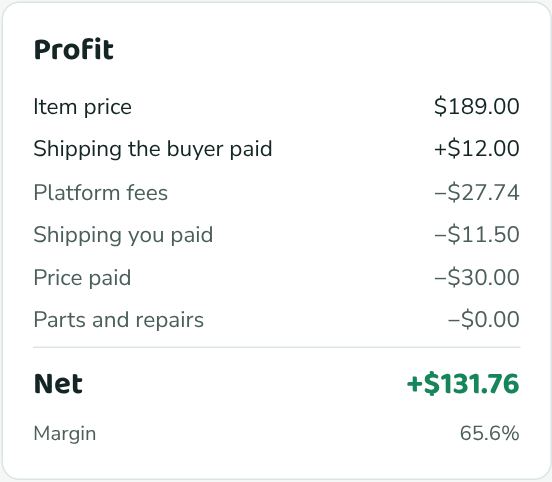
List price or sale price?
List price is what you're asking while the item is for sale. Sale price is what the buyer actually paid. They're often the same, but not after an offer or a price drop. Profit always uses the sale price.
How estimated fees work
When Platform fees is blank, Hermes uses the platform's Fee % and Per order $ from Settings → Selling platforms. The percentage applies to the item price plus the shipping the buyer paid, which is how eBay charges. For example, an eBay sale of $100 with $12 shipping: 13.6% × $112 + $0.40 = $15.63.
Shipping the item
In the Shipping section you can add the Date shipped, Carrier, and Tracking number. eBay fills these in for you on eBay sales.