
Help Center Items
Track parts and repairs
Add the cost of parts and repairs so they come off the profit.
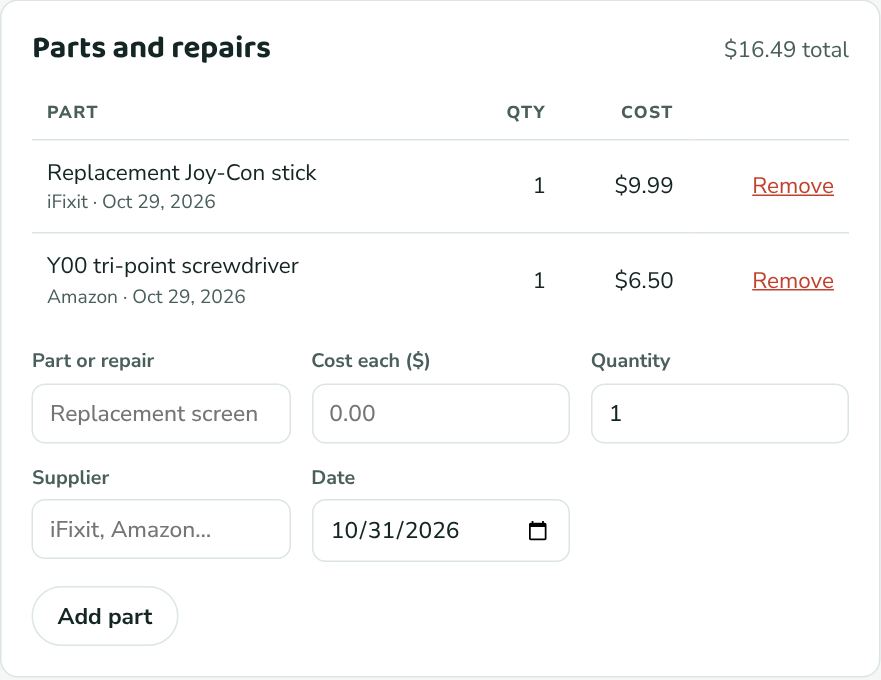
- Open the item.
- In Parts and repairs, enter the Part or repair (e.g. "Replacement screen"), the Cost each, and the Quantity.
- Optionally add the Supplier (iFixit, Amazon…; ones you've used before are suggested) and change the Date, which starts as today.
- Click Add part. The total at the top of the card updates, and the item's cost goes up by that amount.
If the item was Bought or Returned, adding a part moves it to In repair. Not fixing it yet? Click Undo in the message at the top of the page.
To take a part off, click Remove next to it. Adding and removing parts is recorded in the item's history.